
HPE Server Skills Employers Want: iLO, Firmware Updates and Server Deployment in Practice
The HPE server skills employers ask for are practical ones: managing a ProLiant through iLO, keeping firmware current without breaking a cluster, deploying an operating system onto correctly configured local storage, and sizing a server against a customer's workload. This guide explains each skill as it is used on the job, then shows how the HPE ATP - Compute Solutions practice exam fits into proving them.
It is written for working IT people: a Windows or Linux administrator who has inherited a rack of HPE hardware, a data centre technician who wants to move beyond swapping disks, or an engineer at an HPE partner who has to configure and quote servers. None of it assumes you already hold an HPE credential. Where a figure appears, such as an exam fee or a syllabus weight, it comes from HPE's published exam data and is dated, because those numbers change.
What does an HPE compute administrator actually do day to day?
Most of the work on HPE servers happens before and after the operating system, not inside it. An administrator racks and cables a new ProLiant, connects its dedicated management port, sets up the management controller, checks that the firmware matches the rest of the estate, builds the storage layout, installs an operating system or hypervisor and hands the machine over. After that the job is keeping it healthy: reading alerts, collecting logs for support cases, applying firmware and driver updates in planned windows, and replacing failed parts.
Three habits separate a confident administrator from someone who only follows a runbook. The first is knowing which tool owns which task. A firmware problem might be fixed from iLO, from a bootable update image or from a central console, and choosing the wrong one wastes a maintenance window. The second is reading the server's own evidence, such as the Integrated Management Log and the Active Health System data, before guessing. The third is thinking about the customer's workload rather than the box: a virtualisation host, a database server and an edge node in a shop all want different memory, storage and network choices.
Those habits map neatly onto what HPE tests at the associate level. The vendor's exam outline for its compute fundamentals credential gives the largest weights to deploying servers, updating firmware, managing servers through iLO, choosing components and using pre-sales configuration tools. In other words, the certification measures the daily work described above, which is why it is worth learning the skills first and treating the exam as confirmation.
Why iLO is the first skill to learn on any ProLiant server
HPE Integrated Lights-Out (iLO) is the management controller built into ProLiant servers. It runs independently of the operating system, has its own network connection and stays reachable as long as the server has power, even when the server itself is switched off or stuck at boot. For an administrator, that means most physical tasks become remote ones, and the controller is the first thing to configure on a new server.
What you do with iLO in a normal week
- Open a remote console to watch a server boot, change a setting or recover a hung operating system, without walking to the rack.
- Mount an ISO image as virtual media to install or repair an operating system from your desk.
- Power a server on, off or through a cold reset, and schedule those actions.
- Read health data: fans, temperatures, power supplies, memory, drives and the Integrated Management Log.
- Download Active Health System logs, which HPE support asks for in most hardware cases.
- Flash individual firmware components and manage update queues on recent iLO versions.
- Configure users, directory integration, certificates and alerting so the controller is not left on factory defaults.
Some features, such as the full graphical remote console once the operating system is running, depend on an iLO Advanced licence. Knowing what the licence on a given server allows saves a lot of confusion when a colleague says the console button is greyed out.
Why security starts at the management controller
Because iLO can change firmware and power state, it is also an attack surface. Recent ProLiant generations use a hardware root of trust that checks firmware signatures when the server starts, so tampered firmware is detected before it runs. Your part is the configuration: put iLO on a separate management network, replace the default credentials, use directory accounts with roles instead of shared logins, install a trusted certificate and turn off interfaces you do not use. Employers notice candidates who treat the management controller as a security boundary rather than a convenience.
iLO also exposes a Redfish-compliant REST API. You do not need to be a developer to use it, but being able to pull inventory or health data with a short script, instead of clicking through forty servers, is a skill that shows up in job descriptions for larger estates.
How firmware updates are planned and run on HPE servers
Firmware is where a lot of avoidable outages start. A server's system ROM, iLO firmware, storage controller firmware, network adapter firmware and drivers all have to agree with each other and with the operating system. HPE packages tested combinations as the Service Pack for ProLiant (SPP), a bundle of firmware, drivers and tools released on a regular cycle, and the safest practice is to move whole servers from one validated bundle to the next rather than updating parts one by one.
The tools, and when each one fits
- HPE Smart Update Manager (SUM) reads what is installed, compares it with the bundle and deploys the updates, either locally or to several remote nodes. It suits planned maintenance across a group of servers.
- iLO can flash individual components and, on current versions, hold a queue of updates. It suits a single server or one urgent component.
- Intelligent Provisioning, the deployment tool embedded in the server, can also update firmware before an operating system is installed, which is useful on brand-new hardware.
- Central consoles such as HPE OneView and HPE Compute Ops Management apply firmware baselines to many servers at once and report which ones have drifted.
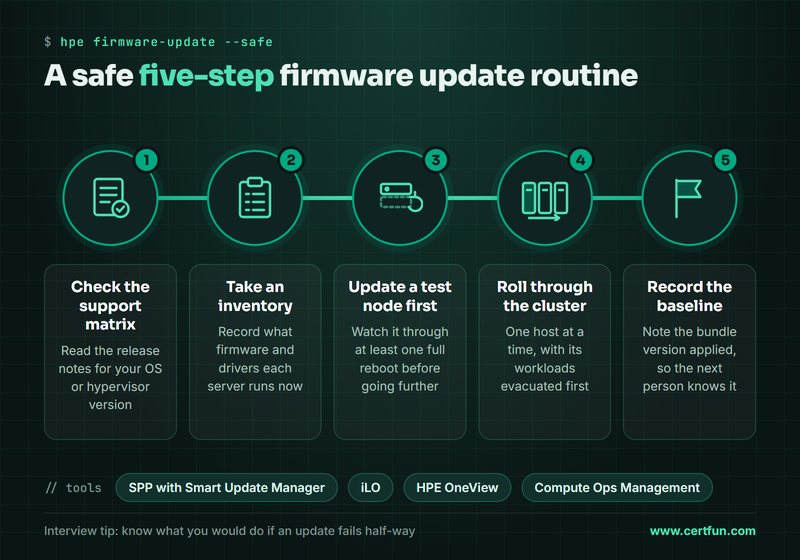
A sensible update routine
- Check the release notes and the support matrix for your operating system or hypervisor version.
- Take an inventory of what each server is running now.
- Update a test or least critical node first and watch it through at least one full reboot.
- Move clustered hosts one at a time, evacuating workloads before each update.
- Record the bundle version applied, so the next person knows the baseline.
Interviewers like to ask what you would do if an update fails half-way. A good answer mentions reading the update log, checking whether the component supports rollback, using iLO's console to see where the server stopped and opening a support case with Active Health System data attached, rather than repeatedly retrying.
Deploying an operating system: Intelligent Provisioning, UEFI and local storage
A server that boots is not the same as a server that is ready. Deployment on HPE hardware usually follows the same path: set the platform options in the UEFI System Utilities (reached with F9 during boot), configure the storage controller and logical drives, then install the operating system, either through Intelligent Provisioning (F10) or from your own media or network deployment service.
Storage choices you must be able to explain
Local storage decisions follow from the workload. A hypervisor boot device needs to be small and reliable; a database needs fast, redundant data volumes; a file server cares more about capacity. You should be able to explain RAID 1 for mirrored boot drives, RAID 5 or 6 for capacity with parity protection and RAID 10 for performance with redundancy, and to configure those logical drives on the server's storage controller before the operating system sees any disks. Getting this wrong is expensive, because changing a RAID layout later usually means rebuilding the server.
Boot mode, drivers and hand-over
Modern deployments use UEFI boot mode, Secure Boot where the operating system supports it, and the drivers from the current Service Pack for ProLiant rather than whatever came on the installation media. Intelligent Provisioning simplifies this by applying HPE drivers during an assisted install. When the build is done, a good administrator records the iLO address, firmware baseline, storage layout and operating system version, so the server can be supported by someone who did not build it.
Sizing a server for a customer: pre-sales tools and workload questions
Not every compute role is operational. HPE partners employ engineers whose job is to turn a customer's requirement into a valid, quotable configuration. That work uses tools such as HPE One Config Advanced (OCA) to build a configuration that HPE will actually ship, and HPE Power Advisor to estimate power and cooling, so the solution fits the customer's racks and circuits.
The tools only help if the questions before them were right. Before configuring anything, ask:
- What workload will run here: virtual machines, a database, virtual desktops, analytics, AI inference or an edge application?
- How much memory and how many cores does that workload really need today, and in three years?
- What capacity and performance does storage need, and is it local or on a shared array?
- What network speeds and redundancy does the site use?
- Is the location a data centre, a branch office or an edge site with limited space, power and staff?
- Will the customer buy the hardware or consume it as a service?
The last question matters because HPE also offers its infrastructure through HPE GreenLake, where customers pay for capacity as they use it. A pre-sales engineer who can explain the difference between buying servers and consuming them as a service, without overselling either, is more useful than one who only knows part numbers.
Knowing the portfolio well enough to choose
You do not need every model number, but you should know the families: rack-mounted ProLiant DL servers for most data centre work, tower ProLiant ML servers for small offices, HPE Synergy for composable infrastructure, Edgeline systems for edge sites, and HPE's high-performance computing lines for very large clusters. Each family answers a different combination of density, expandability and location, and matching the family to the requirement is the first decision in any sizing exercise.
Where the HPE ATP - Compute Solutions credential fits
HPE's Accredited Technical Professional level is its associate tier. The compute fundamentals exam behind the ATP - Compute Solutions credential checks exactly the skills above, which makes it a sensible way to prove them to an employer or to meet a partner's certification requirement. HPE sets out the credential's requirements on its certification page and publishes the exam on its official exam datacard, and the figures below were checked against it and against our exam data in November 2026.
| Item | Detail |
|---|---|
| Credential | HPE ATP - Compute Solutions |
| Exam | HPE Compute Fundamentals (HPE0-S61) |
| Questions | 50 |
| Duration | 90 minutes |
| Passing score | 65% |
| Delivery | Proctored, in English or Japanese |
| Fee (as of November 2026) | 260 USD in developed countries, 145 USD in emerging countries |
No reference material is allowed during the exam, and HPE notes that it may contain unscored beta items. The fee depends on the country price list, so confirm it when you register.
How the syllabus weights line up with the job
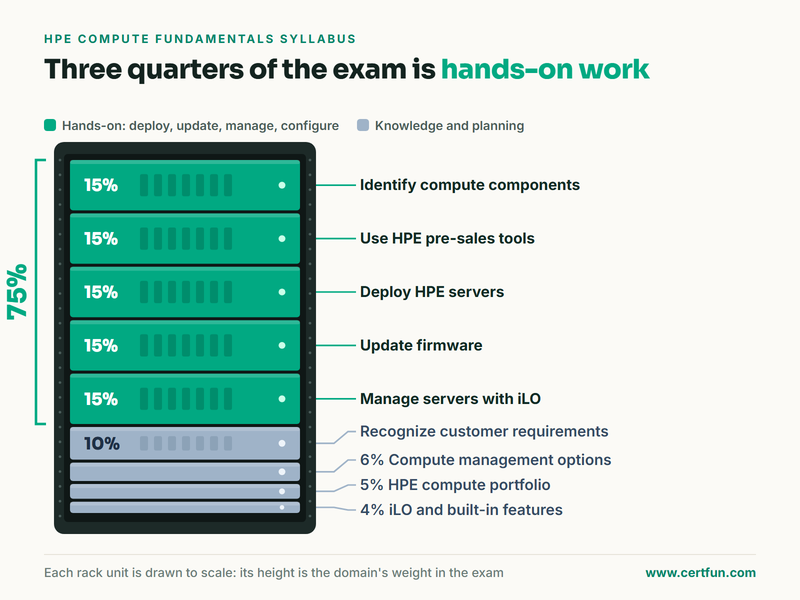
The outline has nine areas. Five carry 15% each: identifying compute components, using HPE pre-sales tools, deploying servers, updating firmware and managing servers with iLO. Recognising customer requirements carries 10%, management options 6%, the compute portfolio 5% and iLO with other built-in server features 4%. Three quarters of the paper is therefore hands-on work: deploying, updating, managing and configuring. The full topic list is on our syllabus page for this exam.
HPE recommends its HPE ATP - Compute Solutions modular curriculum, available through HPE Tech Pro, as the preparation resource. Treat it as the primary source; it is written to the same outline the exam uses.
How to build these skills in six weeks with a lab and a practice test
Six weeks at five to eight hours a week is a realistic pace for someone who already administers servers. The key is hands-on time. If your employer has a spare ProLiant, use it. If not, HPE's online demonstrations and a colleague's test server are better than reading alone, because most of the syllabus is about where a setting lives and what happens when you change it.
- Week 1, portfolio and components. Learn the server families, processors, memory population rules, storage controllers, network adapters and power supplies. Read a few QuickSpecs documents end to end.
- Week 2, iLO. Configure a controller from scratch: network, users, directory, certificates, alerts. Use the remote console and virtual media, read the Integrated Management Log, download Active Health System data.
- Week 3, deployment. Walk through UEFI System Utilities, build RAID logical drives, install an operating system with Intelligent Provisioning and again from your own media.
- Week 4, firmware and management. Plan and run an update with a Service Pack for ProLiant and Smart Update Manager; compare iLO, OneView and Compute Ops Management for the same task.
- Week 5, customers and pre-sales tools. Configure two or three example solutions in One Config Advanced and Power Advisor for different workloads, and write down why you chose each component.
- Week 6, practice and review. Take a timed practice test, list every weak topic by syllabus area, revisit those in the lab, then take a second timed attempt before booking.
A practice test is most useful as a diagnostic, not as something to memorise. Fifty questions in ninety minutes leaves under two minutes per question, so timed attempts show whether you can recognise the right tool quickly. Questions you get wrong point you back to the syllabus area and the lab task you skipped. The practice material CertFun sells is not HPE material; it is written to HPE's published outline and is meant for rehearsal alongside the official curriculum.
Which jobs use these skills, and how to show them to an employer
The same set of HPE compute skills appears in several job titles. Server and systems administrators use them every day. Data centre technicians use iLO, firmware and component knowledge to fix hardware faster and with fewer escalations. Engineers at HPE partners and resellers use the pre-sales tools and portfolio knowledge to configure and quote solutions, and their employers often need a minimum number of certified staff to keep partner status. Support engineers use log collection and firmware knowledge to resolve cases.
To make the skills visible, describe outcomes rather than tools. Instead of listing iLO on a CV, say that you moved a server estate onto a single firmware baseline, cut on-site visits by managing servers remotely, or rebuilt a failed host from virtual media within a maintenance window. In interviews, be ready to talk through one firmware update and one deployment you ran, including what went wrong.
The credential adds a recognised, vendor-backed signal on top of that experience. It is an associate-level credential, so it rewards practical familiarity more than deep design knowledge. HPE's professional and expert compute credentials build on it if you later move into architecture or larger integration work.
Start with the skill you use least today, whether that is iLO security, firmware baselines or sizing a server for a workload, and build it in a lab this week. The exam will then be a check on work you can already do.
Frequently Asked Questions
What is HPE iLO and why do employers ask about it?
iLO, Integrated Lights-Out, is the management controller built into HPE ProLiant servers. It gives remote console, virtual media, power control, health data and firmware updates even when the operating system is down. Employers ask about it because most hardware administration and troubleshooting on HPE servers starts in iLO.
What is the safest way to update firmware on HPE servers?
Move each server from one validated Service Pack for ProLiant bundle to the next rather than updating components one by one. Check the operating system support matrix, update a test node first, move clustered hosts one at a time after evacuating workloads, and record the baseline applied for whoever supports the server next.
How many questions are on the HPE Compute Fundamentals exam and what score is needed?
As of November 2026, HPE lists 50 questions in 90 minutes with a passing score of 65%. The exam is proctored, delivered in English or Japanese, and costs 260 USD in developed countries or 145 USD in emerging countries. No reference material is allowed and some items may be unscored beta questions.
Which tools does an HPE pre-sales engineer use to configure servers?
HPE One Config Advanced builds configurations that HPE will actually ship, and HPE Power Advisor estimates power and cooling so the design fits the customer's racks and circuits. Both depend on asking the right workload questions first: memory, cores, storage, network, location and whether the customer buys or consumes the infrastructure.
Do I need hands-on HPE hardware to learn these skills?
It helps a great deal, because most of the work is knowing where a setting lives and what happens when you change it. A spare ProLiant at work or a colleague's test server is ideal. Without one, combine HPE's curriculum and online demonstrations with careful study of documentation and timed practice questions.
Is the CertFun practice exam official HPE material?
No. Nothing CertFun sells is HPE material. The practice exam is written to HPE's published outline, question count and duration, and is meant as a timed rehearsal and diagnostic tool alongside HPE's own ATP - Compute Solutions modular curriculum, which remains the primary preparation source.


